Agent collision occurs when multiple customer service agents attempt to respond to the same ticket simultaneously, which can confuse customers, waste company resources, and create inefficient communication.
What is Agent Collision?
Agent collision happens when more than one customer service agent tries to reply to the same ticket at the same time. This creates several problems:
-
Customer confusion: Receiving multiple conflicting or duplicate responses
-
Wasted resources: Multiple agents spending time on the same issue
-
Inefficient communication: Lack of coordination and context
-
Poor customer experience: Inconsistent or contradictory information
VowChat provides built-in features to prevent agent collision and ensure smooth collaboration.
VowChat's Prevention Methods
1. Assignee for Conversation
The most effective way to prevent collision is to assign conversations to specific agents.
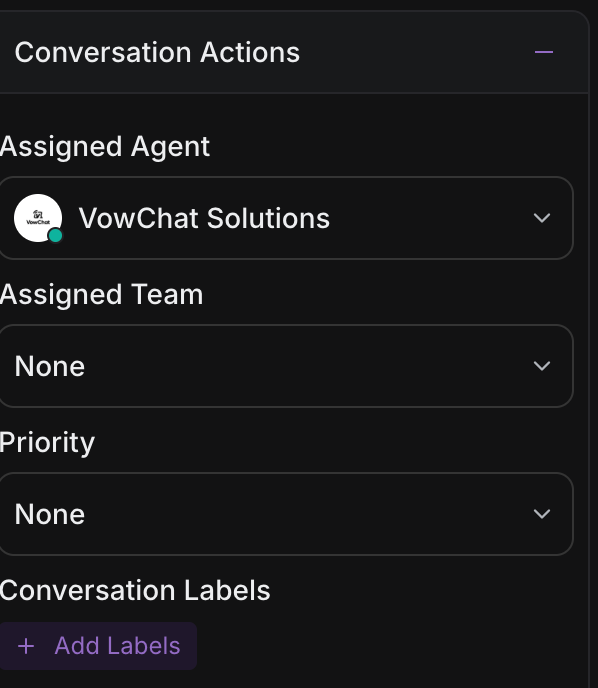
How it works:
-
Agents can assign conversations to themselves or teammates
-
Assigned conversations clearly indicate who is responsible
-
Other agents can see the assignment and avoid interfering
-
Helps distribute workload and maintain accountability
To assign a conversation to yourself:
-
Open the conversation
-
Look for the Assigned Agent section in the sidebar
-
Click Assign to me
-
You're now the designated owner of this conversation
Benefits:
-
Clear ownership and responsibility
-
Prevents duplicate work
-
Maintains conversation context with one agent
-
Enables better tracking and follow-up
2. Typing Indicators
VowChat shows real-time typing indicators when another agent is composing a response, preventing duplicate or conflicting replies.
Web App Collision Detection
When viewing a conversation in the web app, you'll see an indicator if another agent is typing. This alert helps you:
-
Pause before composing your own response
-
Coordinate with the other agent
-
Avoid sending duplicate information
-
Wait for the other agent to finish if appropriate
Mobile App Collision Detection
The mobile app also displays typing indicators, ensuring collision prevention works across all platforms.
How it works:
-
Agent A opens a conversation and starts typing
-
Agent B opens the same conversation
-
Agent B sees "Agent A is typing..." indicator
-
Agent B can choose to wait, coordinate, or move to another conversation
Benefits:
-
Real-time awareness of other agents' actions
-
Prevents overlapping responses
-
Enables quick coordination
-
Works across web and mobile platforms
Best Practices to Prevent Collision
1. Use Assignment Consistently
-
Assign conversations to yourself when you start working on them
-
Check if a conversation is already assigned before responding
-
Respect assignments from other agents
2. Monitor Typing Indicators
-
Watch for typing indicators before composing responses
-
If you see another agent typing, wait or coordinate
-
Use internal notes to communicate with the typing agent if needed
3. Team Communication
-
Use private notes to communicate with teammates about conversations
-
Establish team protocols for handling unassigned conversations
-
Coordinate on complex issues requiring multiple agents
4. Workflow Organization
-
Create clear assignment rules and automation
-
Use labels and priorities to organize work
-
Filter conversations to focus on your assigned tickets
When Multiple Agents Are Needed
Sometimes collaboration is beneficial:
-
Complex technical issues: Multiple specialists contribute expertise
-
Escalations: Supervisors join ongoing conversations
-
Training: Senior agents coach newer team members
In these cases:
-
Use private notes to coordinate internally
-
The assigned agent remains the primary responder
-
Additional agents provide support through internal collaboration
-
Only the assigned agent sends customer-facing messages
By using VowChat's assignment and typing indicator features, your team can work efficiently without collision or confusion.